ALCHEMY
Drop any audio file, stretch it into a wash, set a rhythm, shape it, play. One instrument instead of a piano roll, a sampler and an envelope.
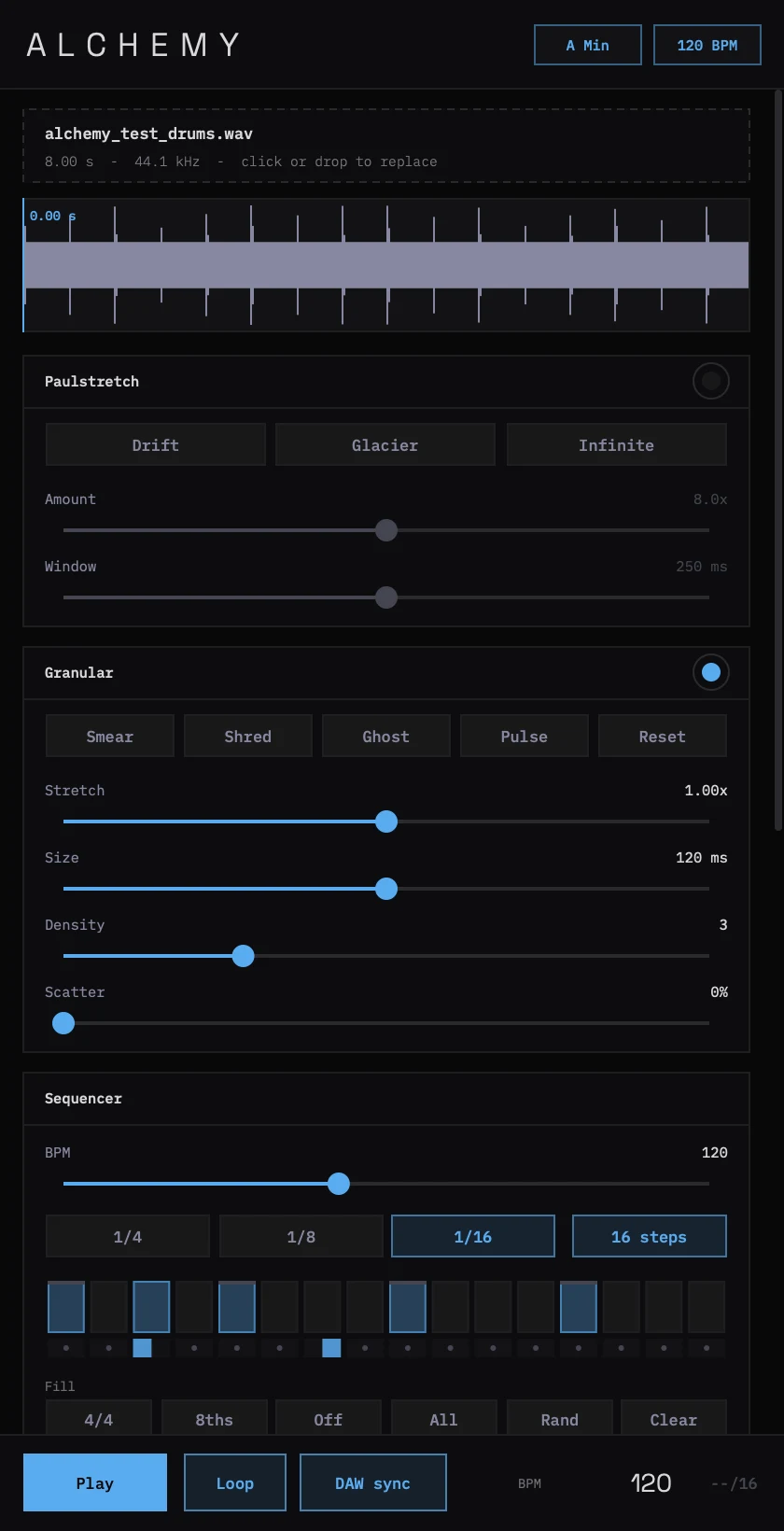
Paulstretch turns the file into a smooth, continuous ambient sound up to 50 times longer. Steps then trigger slices of your sample through a granular engine and an ADSR envelope, with per-step panning, swing and a lowpass filter. Time-stretch spreads grains across the file, so pitch never changes.
First install: the installer isn't signed by Apple yet, so macOS blocks it the first time. Open it, press Done, then go to System Settings → Privacy & Security, scroll down and press Open Anyway. You only do this once.
01Install
- Download the installer above and open it. If macOS says it can't be opened, use Open Anyway as described above.
- Click through the installer. It puts Alchemy.vst3 in /Library/Audio/Plug-Ins/VST3 and Alchemy.component in /Library/Audio/Plug-Ins/Components. Untick either under Customise if you don't want it.
- Open Ableton Live. If Alchemy isn't listed under Plug-ins → Instruments, go to Settings → Plug-ins, make sure Use VST3 Plug-in System Folders (or Audio Units) is on, and press Rescan.
- Drag Alchemy onto a MIDI track. It's an instrument: no MIDI clip is needed.
02Quick start
- Drop an audio file anywhere on the plug-in (WAV, AIFF, MP3, M4A, FLAC), or click the load zone to browse. The header shows the detected key and BPM.
- For ambient textures, switch on Paulstretch (or press Drift, Glacier or Infinite). Alchemy renders a stretched copy in a second or two and the waveform shows it. Longer Window = smoother.
- Click on the waveform to set the start point (the cyan line).
- Click steps to switch them on, drag to paint. Click the thin row under each step to pan it L → C → R.
- Press Play in Ableton. With DAW sync on (the default) Alchemy follows Live's tempo and transport. Turn it off to run on its own BPM with the Play button.
- Try the granular presets (Smear, Shred, Ghost, Pulse), then shape with the envelope knobs and the filter. Double-click any control to reset it.
03What's inside
Paulstretch
Stretch the whole file 1–50× into a continuous wash, pitch unchanged, window 40 ms to 2 s. The sequencer and grains then play the stretched sound.
Granular engine
Stretch 0.25–4×, grain size 20–500 ms, density 1–8, scatter. Hann-windowed grains, no clicks. Bypass for direct playback.
Step sequencer
8 or 16 steps, 1/4, 1/8 and 1/16, swing up to 70%, gate 5–100%, per-step pan, quick fills.
Pattern slots
Ten slots with factory patterns. Name, save, load and clear; they're saved with your Live set.
Envelope & filter
ADSR with a live shape display, resonant lowpass from 80 Hz to 20 kHz.
DAW sync
Locks to the host's tempo and beat grid, sample-accurate. Starts and stops with the transport.
Recall
Every setting, the pattern, the slots and the sample's location are saved with the project and reloaded when you open it.
04Details
| Version | 1.0.0 (19 Nov 2026) |
| Formats | VST3 and Audio Unit (instrument), universal: Apple silicon and Intel |
| System | macOS 10.13 or later. Windows to follow. |
| Tested | Apple auval and pluginval at strictness 10 (both formats) on every build, plus timing, DAW sync, pitch and recall tests |
| Hosts | Ableton Live, Logic Pro, GarageBand, Bitwig, Reaper, Studio One and other VST3 or AU hosts |